Money & accounts
Customers and dues
Keep customer records, sell on due within a credit limit, collect dues with a money receipt, send SMS reminders, and track refills and doctor commission.
For:CashierPharmacistManagerOwnerAccountant
On this page
When you save your regular patients as customers, you can see their purchases, allergies and dues in one place. This chapter covers customers, selling on due (baki), collecting dues, reminders and doctor commission.
The customer list
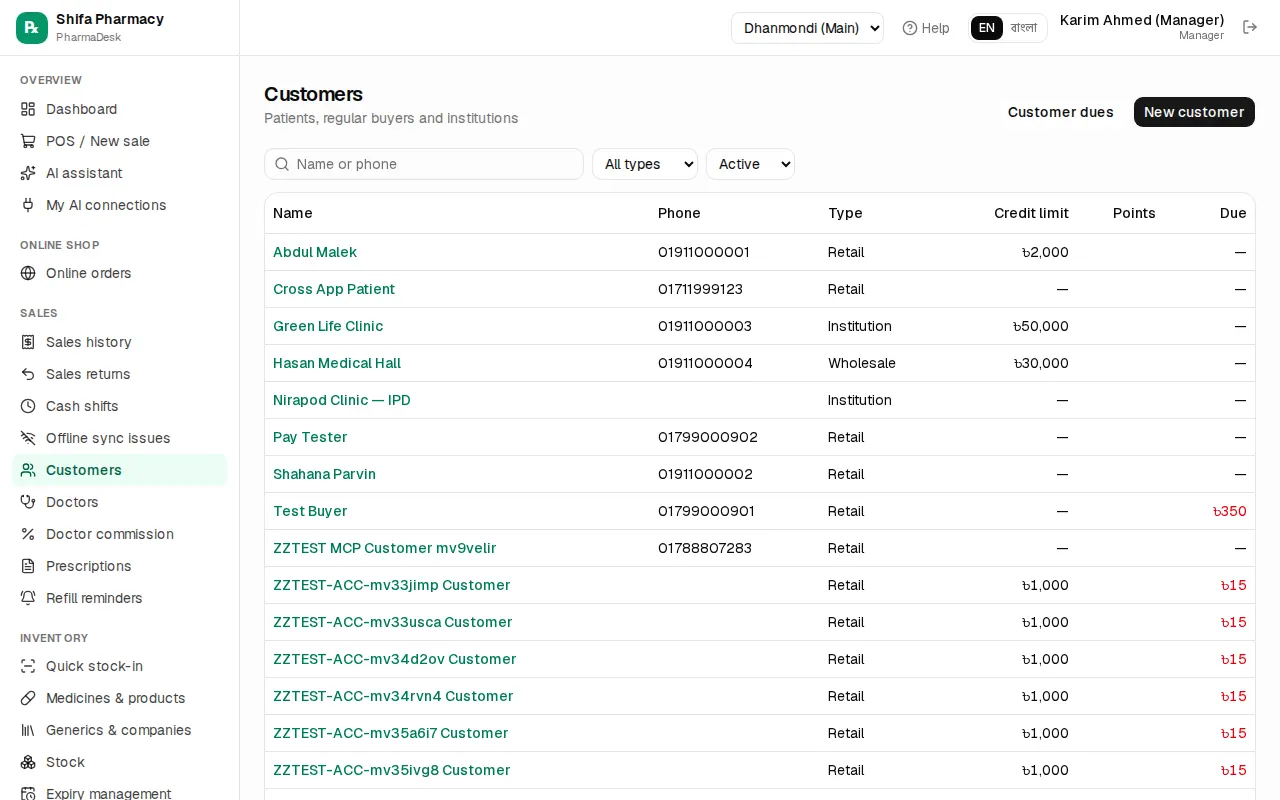
Go to Sales › Customers. Cashiers, pharmacists, managers and the owner can open it. Search by name or phone, and filter by type (Retail, Wholesale, Institution) or status. The Due column shows how much each person owes.
Add or edit a customer
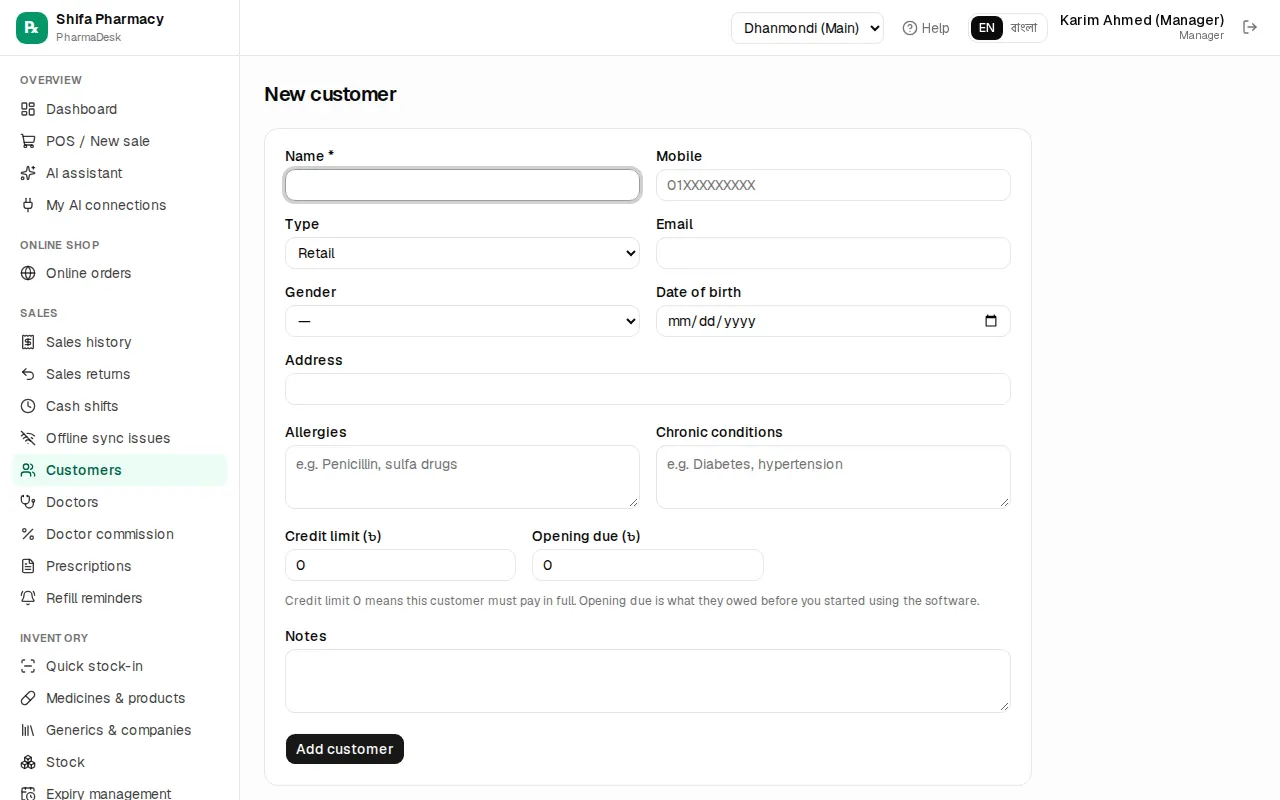
- Click New customer.
- Fill in Name and Mobile. You need the mobile number for SMS and refill reminders.
- Choose the Type: Retail, Wholesale (pharmacy / shop) or Institution (clinic / hospital).
- If you know them, add Allergies and Chronic conditions. The allergies show in yellow at the POS.
- Credit limit (৳): the most this customer can owe. 0 means they must always pay in full.
- Opening due (৳): what they already owed before you started using PharmaDesk.
- Click Add customer.
You can also add a customer at the POS with just a name and phone (F4). See Daily selling.
To change details, open the customer and click Edit. If someone no longer buys from you, click Deactivate. Their history is kept.
The customer page
Click a name to see Current due (with the limit), Purchases, Last visit and Loyalty points. There are four tabs:
- Purchases: the last 50 invoices.
- Ledger: every sale, payment and return, with the running Balance.
- Prescriptions: saved prescriptions. Add prescription adds a new one.
- Refill reminders: this customer's reminders. Add refill reminder adds a new one.
If an AI assistant has drafted an SMS for this customer, it appears under SMS drafts (not sent). It is only sent when you click Send. Discard throws it away.
Selling on due (baki)
At the POS, choose the customer and lower Cash received. The rest becomes due. The rules:
- A due can't be left without choosing a customer.
- The customer's total due after the sale can't go over their credit limit.
- A manager or the owner can allow a bigger due with Manager override: allow this due.
Every due sale goes into the customer's Ledger and into Customer dues.
Collecting dues
A manager, accountant or the owner can collect dues. A cashier can't, so if a customer comes to pay, call the manager.
- Go to Finance › Customer dues.
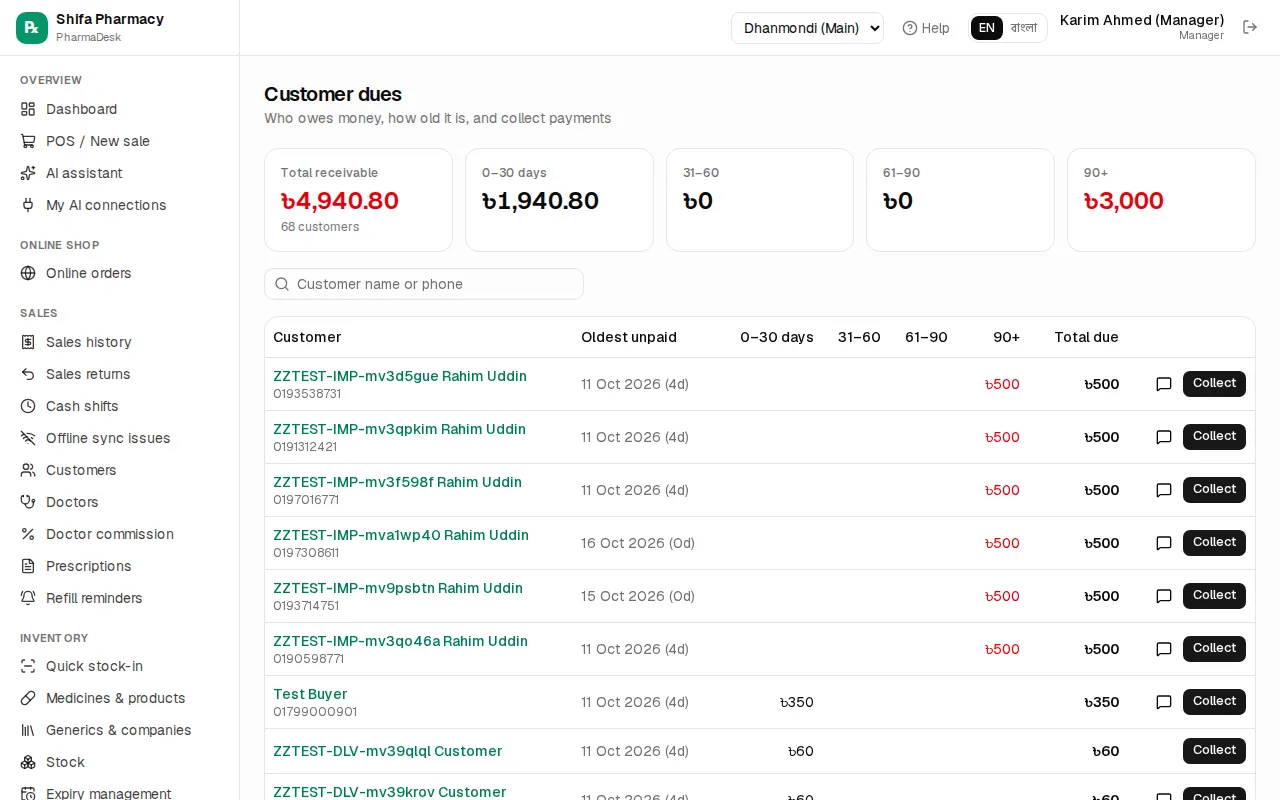
- At the top you'll see Total receivable and the age groups (0–30 days, 31–60, 61–90, 90+). The table shows each customer's Oldest unpaid date and Total due. If a customer is past their limit, over limit shows in red.
- Search by name or phone, and click Collect on that customer's row.
- Check the Amount (৳). It starts at the full due, so lower it for a part payment.
- Choose the Method (Cash, bKash, Nagad, Rocket, Card, Bank, Cheque) and, if needed, the Into account.
- Type the TrxID or cheque number and a note if you have them, then click Save payment.
- Click Print money receipt to give the customer a money receipt, then Done.
You can also collect from the customer's page with the Collect button. The last 10 payments are listed under Recent collections, and the Receipt link reprints the money receipt.
SMS reminders
On Customer dues, each customer with a phone has a message icon (Send due reminder SMS). Click it and an SMS goes out telling them how much they owe. Nothing is sent automatically. You click it each time.
SMS only works when all three of these are true:
- Send SMS (refill reminders, dues) is on in Admin › Settings.
- Support has set up the SMS gateway.
- Your plan includes SMS.
If anything is missing, you'll see SMS not sent with the reason.
Refill reminders
Patients on daily medicine (diabetes, blood pressure, thyroid) can be reminded before they run out.
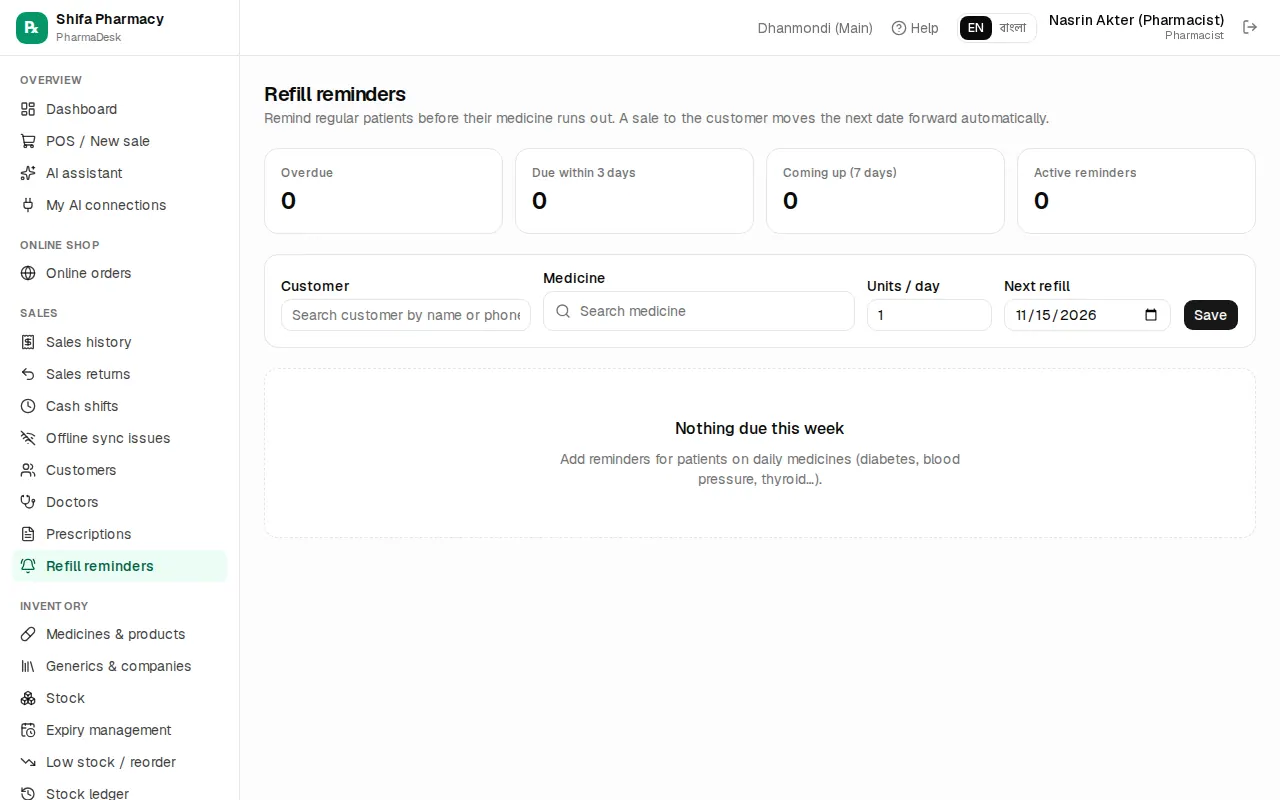
- Go to Sales › Refill reminders.
- In the form at the top, choose the Customer (they must have a phone number) and the Medicine.
- Type the Units / day, for example 2 tablets a day.
- Pick the Next refill date and click Save.
The list is grouped into Overdue, Due now and Coming up. On each row you can click SMS to send a reminder, Contacted once you've called them, or Stop to turn the reminder off.
When this customer buys the same medicine again, the next date moves forward on its own. For example, 60 tablets at 2 a day moves it 30 days on. You set how many days ahead counts as "due now" in Stock alerts & reminders in settings.
Doctors and commission
Sales › Doctors (pharmacist, manager, owner): click New doctor and enter Name, Degrees, Specialty, BMDC reg no., Phone and Chamber. If the doctor gets a referral commission, set the Referral commission (%). Then click Add doctor. Choose the doctor at the POS and the commission is counted by itself.
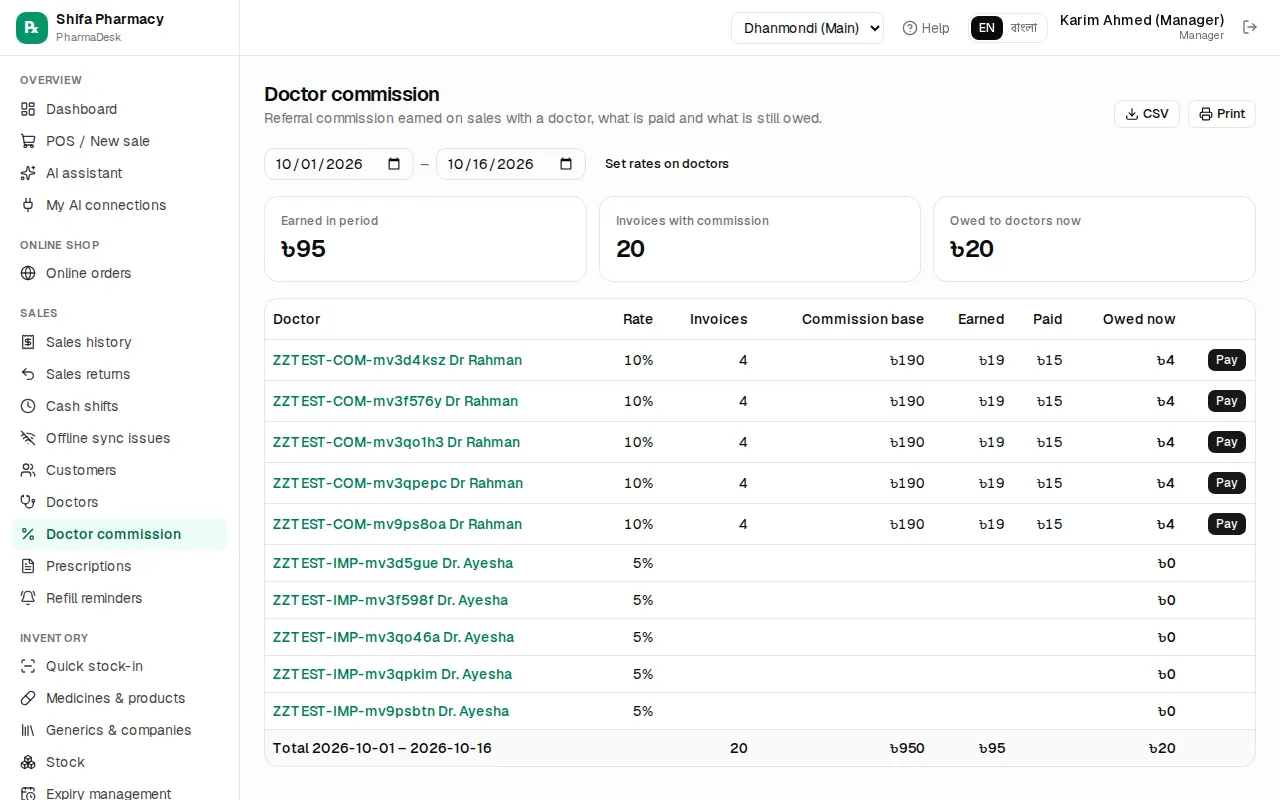
Sales › Doctor commission (manager, accountant, owner) shows, for the chosen dates, each doctor's Invoices, Commission base, Earned, Paid and Owed now. To pay a doctor, click Pay, check the Amount (৳), choose Paid from, and click Save payment. If a sale is returned or voided, the commission is reduced automatically.
Common mistakes
- Saving a customer without a mobile number, so no SMS or refill reminder can be sent.
- Leaving the credit limit at 0 and then wondering why the due won't save.
- Taking a part payment but leaving the full due in Amount (৳) in the collect window.
- Not choosing the doctor at the POS, so no commission is counted.